
The problem
Homebrew is great once you know the name of the thing you want. Finding it, cleaning up after an app, or understanding a warning from brew doctor is harder than it should be.
What I built
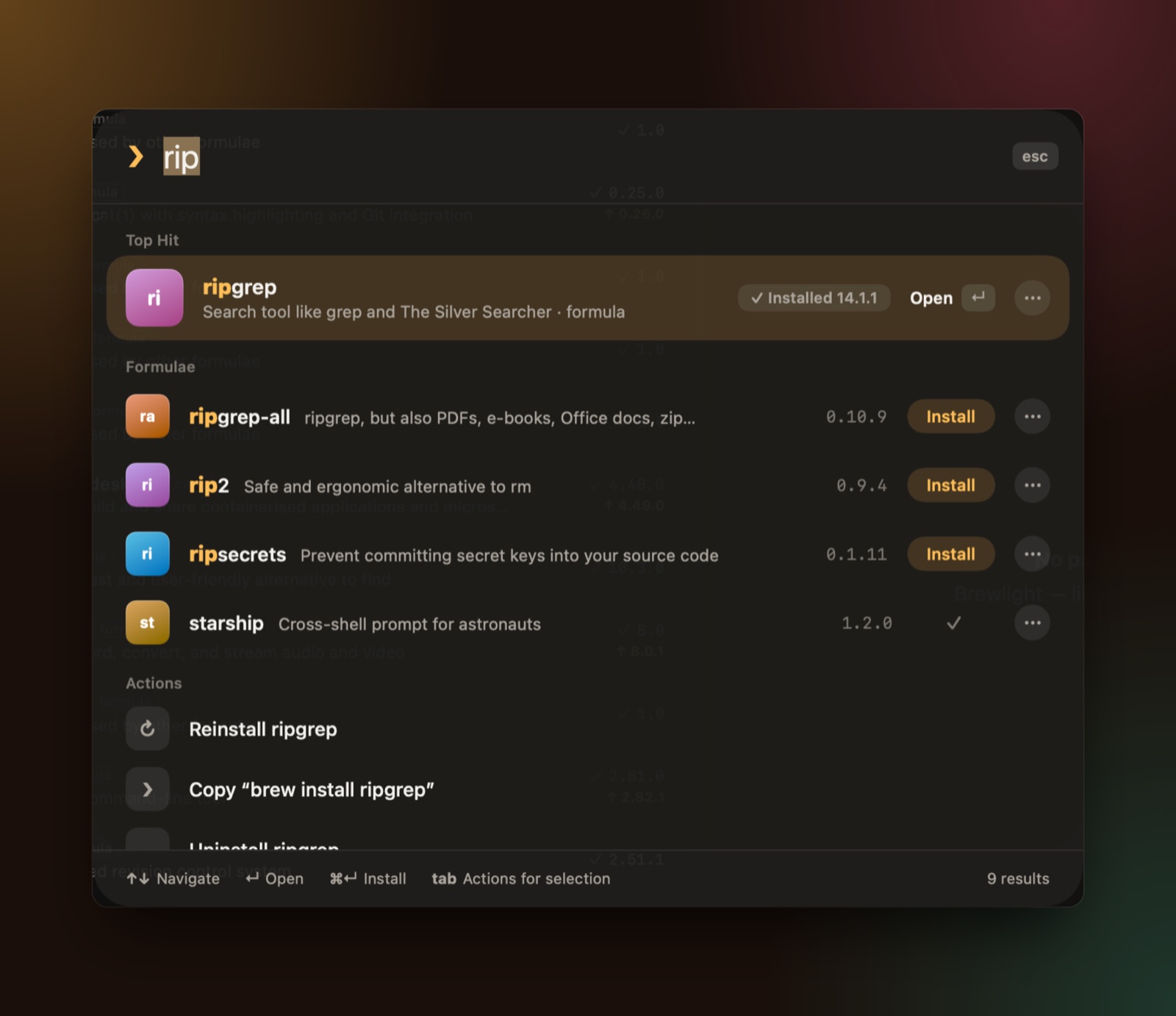
Press ⌘K and one palette searches every Homebrew formula and app, plus actions, on every keystroke. It takes about 3 ms across the whole catalogue. You can filter with things like is:outdated, type:cask or cat:fonts, or just type “an app to edit videos” and it turns that into filters. Install, upgrade, pin and remove in one click, manage services and taps, and back up with Brewfiles.
When you remove an app, Brewlight lists every leftover file with its size so you can bin the lot. Every confirmation shows the exact brew command that will run, so nothing happens behind your back. Warnings are explained in plain language, and the app is translated into six languages.
The hard parts
Opening instantly. It shows what it knew last time straight away and refreshes from Homebrew in the background, so you’re never staring at a spinner.
Search that feels like Spotlight. It matches thousands of names and descriptions on every keystroke, puts the obvious answer first as a top hit, and mixes in actions like “reinstall” or “copy the install command” right next to the packages.
You can install it with brew install --cask brewlight. It needs macOS 26 or later.