 CampfireA chat room for everyone nearby
A chat server that fits in your pocket
How Campfire runs a Ktor server on one phone for everyone nearby, keeps every chat rule in one class that never touches a socket, and stops a pasted link from probing your router.
Campfire turns one phone into a chat room for everyone nearby. They join from whatever browser they have, with no app to install, no account and no internet. When the host ends it, every message and file is gone.
What it solves
A classroom, a workshop, a group on a trip. For an hour, everyone needs to share links, photos and files. The usual answer is a group chat, which means collecting twenty phone numbers, and then that group sticks around forever.
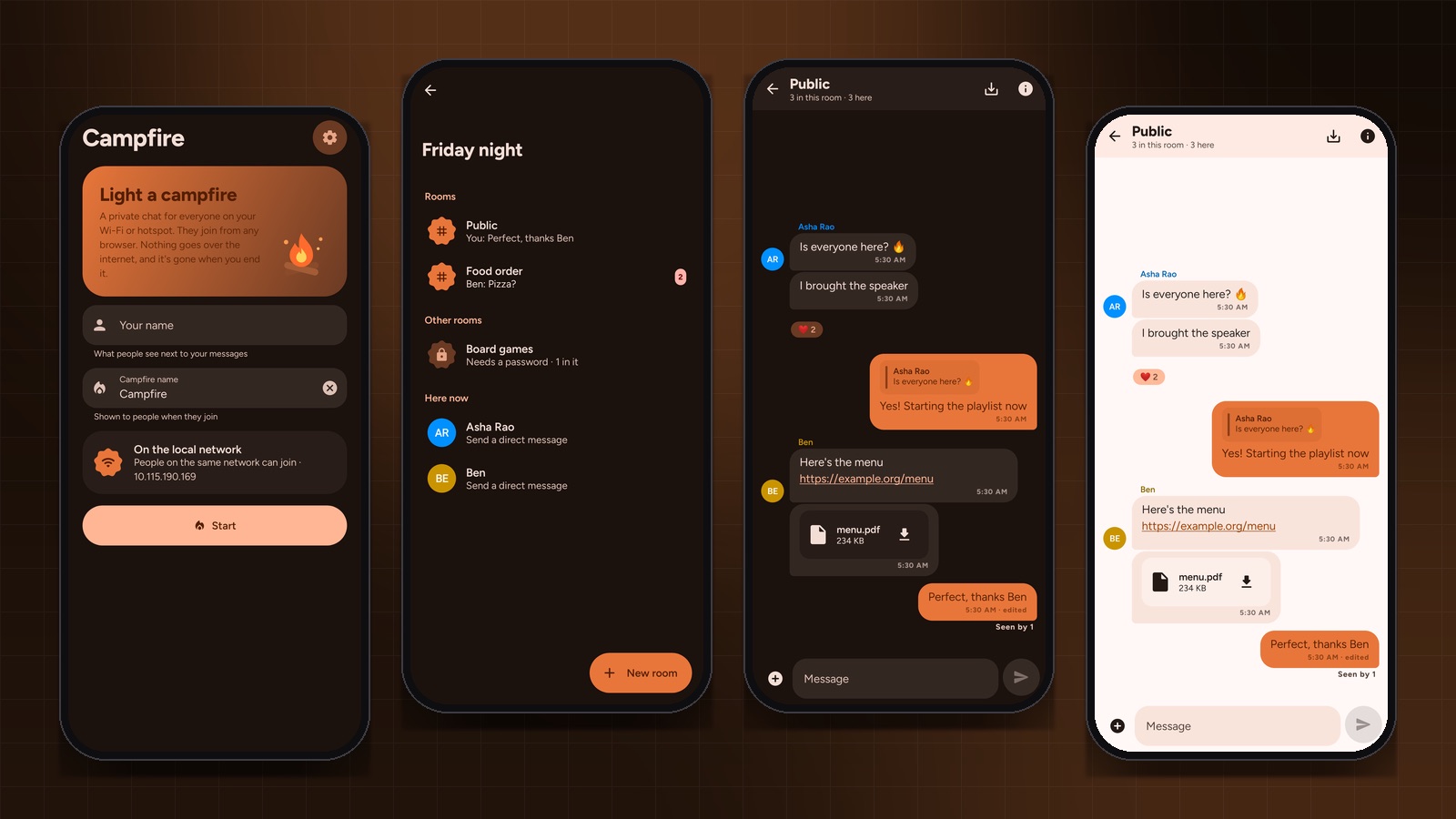
Start a Campfire and the phone shows a link and a QR code. Anyone on the same Wi-Fi, or on your hotspot, opens it, picks a name and is in. There’s a public room that’s always there, rooms anyone can start with an optional password, direct messages, replies, reactions, edits, polls, pins, voice notes, read receipts, files of any size with photos and videos playing inline, and link previews.
Built with
- Kotlin on Android 10 and up, running Ktor 3 as an HTTP and WebSocket server on port 8080.
- kotlinx.serialization for the JSON protocol between server and browsers.
- Preact and htm for the browser client, with no build step. Both are vendored and the font is bundled, so nothing ever loads from the internet.
- A WebView for the host’s own chat, which is the same web client the guests use.
Every rule in one class
The design choice I’d keep for any project like this: all the chat rules live in one plain Kotlin class, ChatState. Rooms, passwords, admins, direct messages, edits, reactions, receipts, typing, polls and pins are all in there, and none of it knows sockets exist.
Each command goes in, and a list of deliveries comes out: which event, for which people. The class never sends anything itself.
/**
 * Every chat rule lives here. Each call returns the events to send and who gets them; it never
 * does I/O, so the server can run it from one coroutine and tests can call it directly.
 */
class ChatState(
    private val ids: IdSource = RandomIds(),
    private val historyCap: Int = 5_000,
) {
    data class Delivery(val to: Set<String>, val event: ServerEvent)

    fun handle(memberId: String, cmd: ClientCommand, now: Long): List<Delivery> {
        val me = member(memberId) ?: return emptyList()
        return when (cmd) {
            is ClientCommand.JoinRoom -> joinRoom(me, cmd)
            is ClientCommand.CreateRoom -> createRoom(me, cmd, now)
            is ClientCommand.RemoveMember -> removeMember(me, cmd)
            is ClientCommand.Send -> send(me, cmd, now)
            is ClientCommand.Edit -> edit(me, cmd, now)
            // ...
        }
    }
}
The payoff is in the tests. They read like a description of the rules, with fake ids so the output is predictable, and they run in milliseconds:
@Test fun joinDedupesNamesAndAddsToPublic() {
    val (asha2, out) = chat.join("asha", 4, false)!!
    assertThat(asha2.name).isEqualTo("asha 2")
    assertThat(chat.room(PUBLIC_ROOM)!!.members).contains(asha2.id)
    assertThat(out.events().filterIsInstance<ServerEvent.Members>()).isNotEmpty()
}

@Test fun createRoomJoinsCreatorAndOpensIt() {
    val out = chat.handle(asha.id, ClientCommand.CreateRoom("  Snacks ", null), 0)
    val room = chat.rooms().single { it.name == "Snacks" }
    assertThat(room.members).containsExactly(asha.id)
    assertThat(out.only<ServerEvent.Opened>().conv).isEqualTo(Conv.room(room.id))
}
One lock, one queue per socket
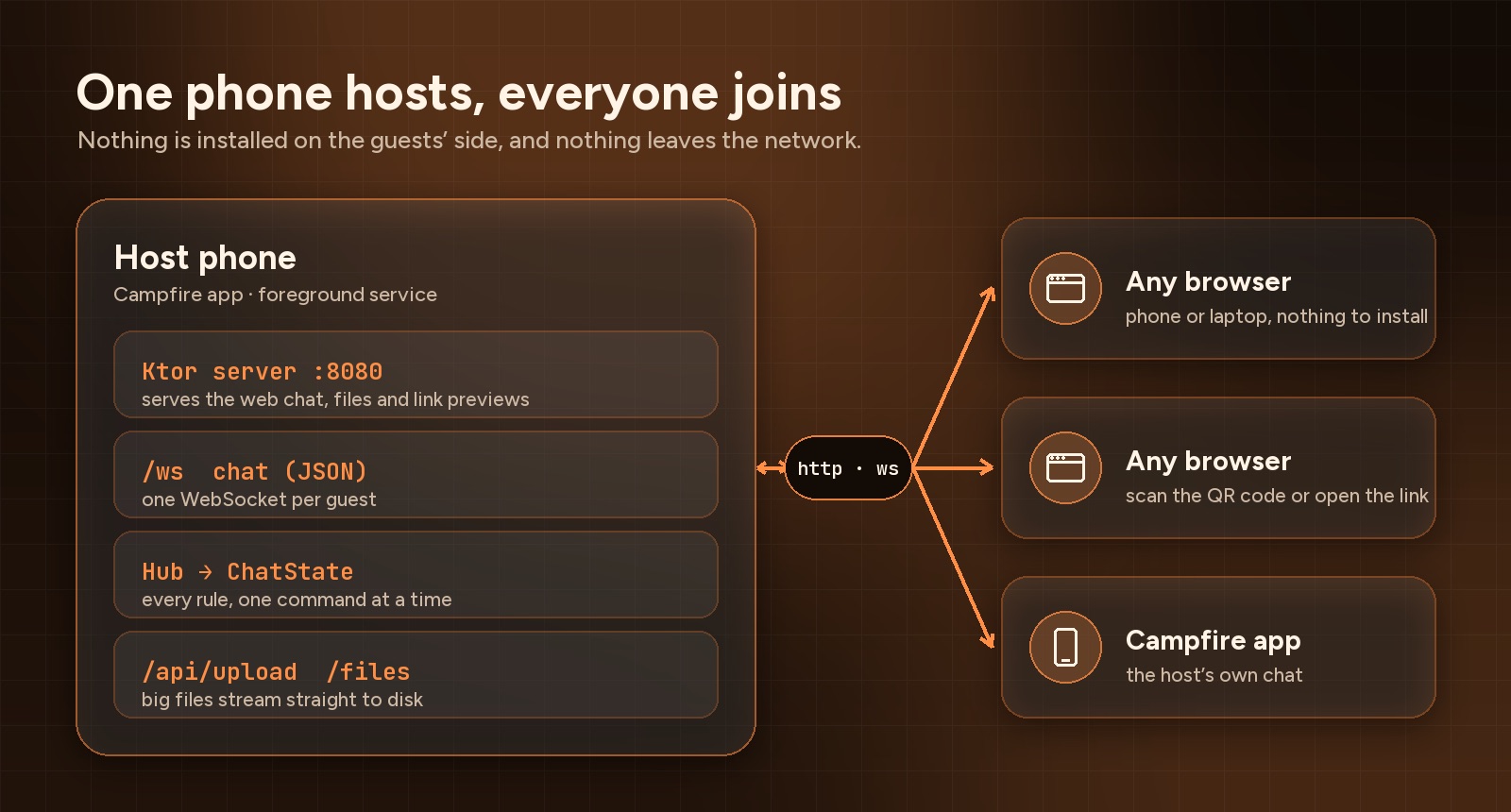
Around ChatState sits a small Hub. Every command runs under a single coroutine Mutex, so the rules never see two commands at once and never need their own locking. Each socket gets its own outgoing queue and its own writer coroutine, so one slow phone on bad Wi-Fi can’t hold up everyone else:
private suspend fun process(memberId: String, cmd: ClientCommand) {
    val deliveries = lock.withLock {
        state.handle(memberId, cmd, clock()).also {
            dispatch(it)
            publishSnapshot()
        }
    }
    // Fetch a link preview for new and edited messages that have a link and no preview yet.
    // ... launched outside the lock, applied back under it when it arrives
}
Link previews are fetched outside the lock, because a slow website shouldn’t freeze the chat. When the preview arrives, it’s applied as one more command under the lock.
Files get the same treatment. Uploads stream straight to disk over plain HTTP instead of going through the WebSocket, so someone sending a large video doesn’t block anyone’s messages. Videos are served with Ktor’s PartialContent plugin, which handles byte ranges, so people can seek without downloading the whole thing first.
A link shouldn’t be able to reach your router
Link previews mean the host phone fetches URLs that anyone in the chat chooses. That’s a classic way to attack a network from the inside: paste http://192.168.1.1/ and let the server fetch it for you. So the previewer only ever talks to public internet addresses:
fun isPublic(addr: InetAddress): Boolean {
    if (addr.isAnyLocalAddress || addr.isLoopbackAddress || addr.isLinkLocalAddress ||
        addr.isSiteLocalAddress || addr.isMulticastAddress
    ) {
        return false
    }
    val b = addr.address.map { it.toInt() and 0xFF }
    return when (addr) {
        is Inet4Address -> !(
            b[0] == 0 ||
                (b[0] == 100 && b[1] in 64..127) || // carrier-grade NAT, also used by hotspots
                (b[0] == 192 && b[1] == 0 && b[2] == 0) ||
                (b[0] == 198 && b[1] in 18..19) ||
                b[0] >= 240
            )
        is Inet6Address -> (b[0] and 0xFE) != 0xFC // unique local fc00::/7
        else -> false
    }
}
Java’s built-in checks cover the usual private ranges, but not all of them. The 100.64.0.0/10 range is the easy one to miss: carriers use it, and so do many phone hotspots, which is exactly where Campfire runs.
Checking the first address isn’t enough either. A public site can redirect to a private one, so the previewer turns off automatic redirects and follows them by hand, checking every hop, and every address a name resolves to:
repeat(MAX_REDIRECTS + 1) {
    val uri = URI(current)
    if (uri.scheme !in setOf("http", "https") || uri.host.isNullOrBlank()) return null
    val addresses = InetAddress.getAllByName(uri.host)
    if (addresses.isEmpty() || !addresses.all(AddressGuard::isPublic)) return null
    val conn = (URL(current).openConnection() as HttpURLConnection).apply {
        instanceFollowRedirects = false
        // ...
    }
    // on a 3xx, resolve the Location header and go round again
}
Uploaded files get one more guard. Anything that could run as a page on Campfire’s own address, like HTML, JavaScript, XML or SVG, is served as a plain download, with X-Content-Type-Options: nosniff so the browser doesn’t second-guess it.
The honest part: it isn’t encrypted
Browsers only allow encryption, and a lot of modern features, on secure pages. A phone on a local network can’t get a trusted HTTPS certificate without scary warnings. So Campfire runs over plain HTTP, and someone watching the same Wi-Fi could read messages and room passwords. Direct messages also pass through the host phone.
I didn’t want to hide that behind a padlock icon. The app and the web chat both say it plainly, so people can decide what to send. For a classroom sharing links, that’s fine. For anything private, use something else.
For working on the web client there’s a dev mode that starts a real Campfire on localhost:8080 and serves the web files straight from disk, so a page reload shows changes.
The source is on GitHub under Apache 2.0.