 CaffeinateCatKeep your Mac awake, even with the lid closed
Keeping a Mac awake with the lid closed, without leaving it broken
Why lid-closed mode needs root, how CaffeinateCat asks for it once for exactly two commands, and the five separate things that make sure your Mac can always sleep again.
CaffeinateCat is a menu bar app that keeps a Mac awake. Keeping one awake with the lid open is easy. Keeping it awake with the lid shut, on battery, is the part that took real work, and most of that work is about one thing: never leaving the Mac unable to sleep afterwards.
What it solves
Sometimes a Mac has to keep going while you’re away from it: a build, a local server, a long download. You can change the sleep settings and remember to change them back, which nobody does. And if you want to close the lid and put the laptop in a bag while it works, on battery, macOS doesn’t offer a switch for that at all.
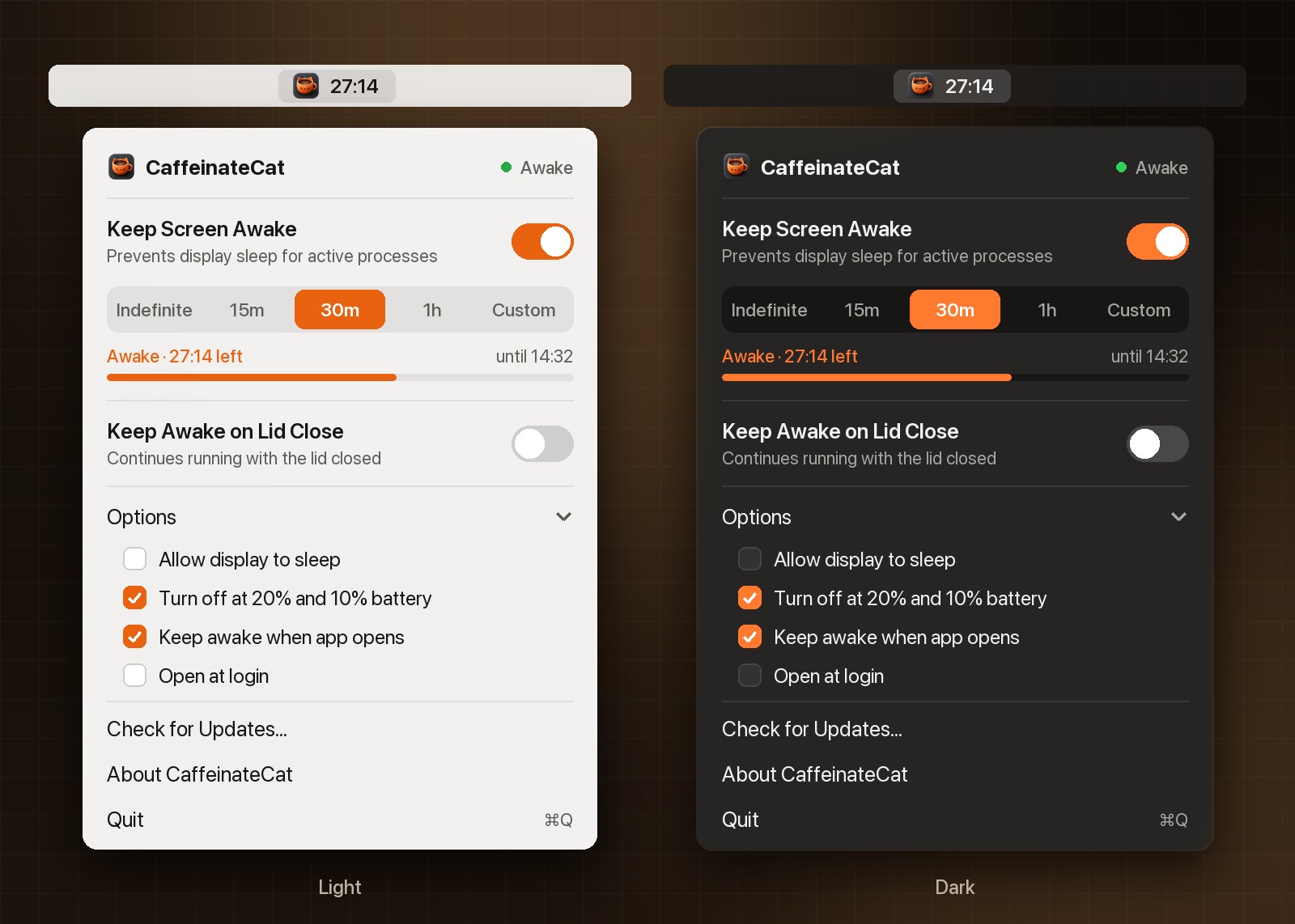
CaffeinateCat has two switches:
| Mode | Idle sleep | Lid closed |
|---|---|---|
| Keep Screen Awake | prevented | Mac sleeps |
| Keep Awake on Lid Close | prevented | stays awake, even unplugged |
Both can run for a set time or until you turn them off. The menu bar icon is a coffee cup that doubles as a battery gauge: orange while it’s keeping the Mac awake, grey when it’s off, steaming in lid-closed mode.
Built with
- Swift 5, as a handful of source files with no Xcode project. A plain
swiftc -O -o CaffeinateCat *.swiftbuilds it. - macOS 12 and up.
- Sparkle for updates, the only dependency.
build.shdownloads a pinned, checksum-verified copy, then builds, signs and optionally notarizes a universal app. - POSIX and Grand Central Dispatch for the parts that have to survive the app dying:
posix_spawn, process groups and dispatch signal sources.
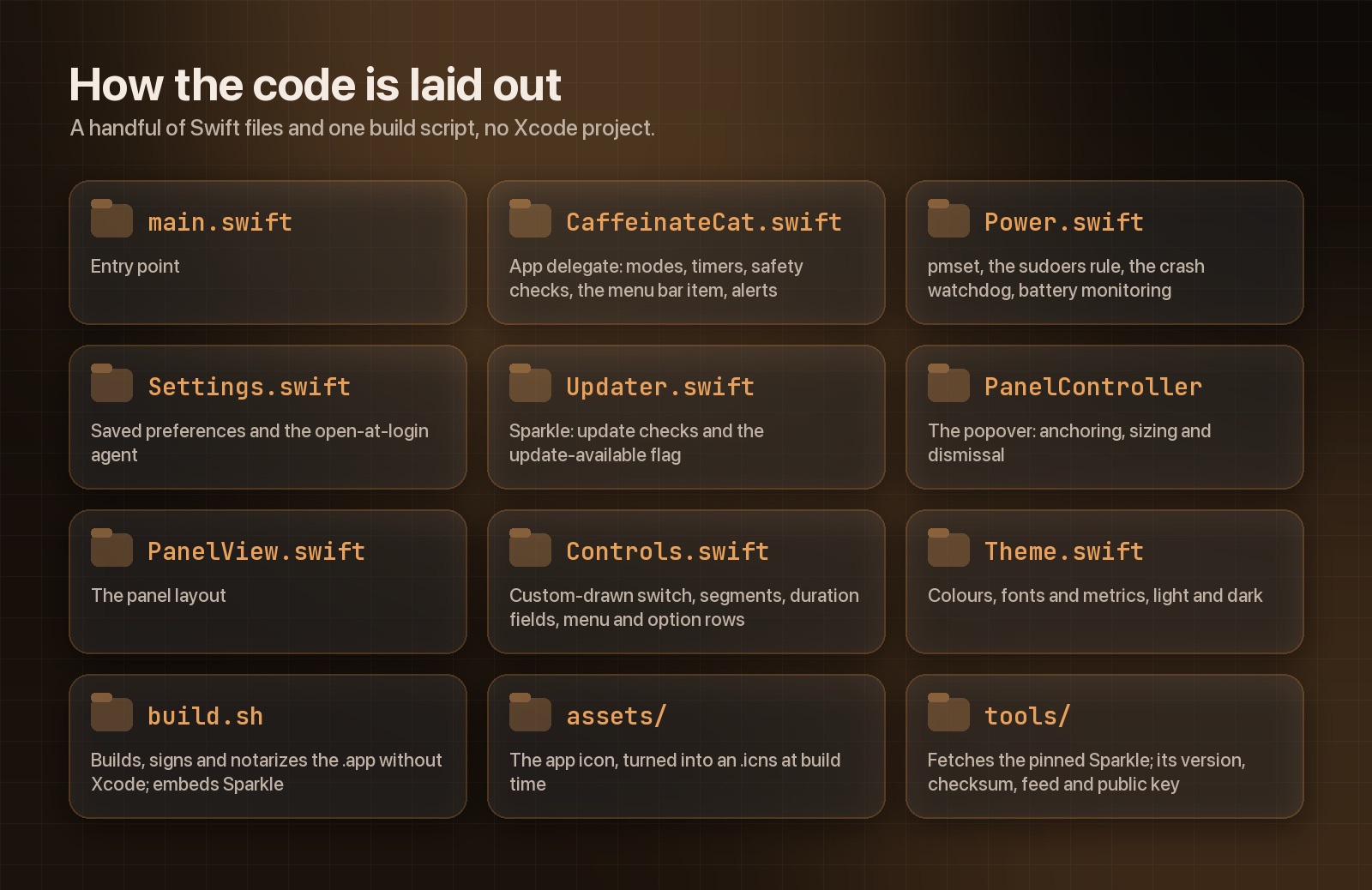
Power.swift is where everything risky lives.The easy mode
If you only want “don’t fall asleep while I’m away from the keyboard”, macOS has a polite API for it. You ask ProcessInfo for an activity that holds off idle sleep, and end it when you’re done:
let activity = ProcessInfo.processInfo.beginActivity(
    options: [.idleSystemSleepDisabled, .idleDisplaySleepDisabled],
    reason: "Keep Screen Awake"
)
// later
ProcessInfo.processInfo.endActivity(activity)
No permissions and no prompts. If the app crashes, the system drops the activity for you. That’s all Keep Screen Awake is.
The catch: closing the lid triggers a different kind of sleep, and these assertions don’t stop it.
The hard mode needs root
On Apple Silicon, the one reliable way I found to keep running with the lid shut on battery is the SleepDisabled flag:
sudo pmset -a disablesleep 1That works. It also needs root, and it survives a reboot. If an app turns it on and then dies without turning it off, the Mac stays unable to sleep, lid closed or not, until somebody notices. The failure mode is a laptop quietly cooking itself in a bag. So the rest of this post is about making that impossible.
Asking once, for exactly two commands
I didn’t want a password prompt every time, and I didn’t want the app running as root. The first time you turn on lid mode, CaffeinateCat installs a sudoers rule that allows exactly two commands, for exactly your user, with no password:
static func installRule() -> Bool {
    guard let user = sudoersSafeUserName() else { return false }
    let rule = "\(user) ALL=(root) NOPASSWD: /usr/bin/pmset -a disablesleep 1, /usr/bin/pmset -a disablesleep 0"
    let shell = [
        "t=$(/usr/bin/mktemp /tmp/caffeinatecat.XXXXXX) || exit 1",
        "echo '\(rule)' > $t && /usr/sbin/visudo -cf $t && /usr/bin/install -m 0440 -o root -g wheel $t \(SUDOERS_PATH)",
        "r=$?; /bin/rm -f $t; exit $r",
    ].joined(separator: "; ")
    return runAsAdmin(shell)
}
You see one native admin prompt, and Touch ID works. Two details in there matter more than they look.
Everything happens inside the root shell. The rule is written to a root-owned temp file, checked with visudo, and installed, all in one privileged command. The obvious way is to write the file in your own temp folder and then install it, but that leaves a gap between the check and the install where any process running as you could swap in a different, equally valid rule and have it installed as root.
The user name is checked, not escaped. It ends up inside a root shell command and a sudoers line, so anything outside a small set of characters is refused:
private static func sudoersSafeUserName() -> String? {
    let user = NSUserName()
    let allowed = Set("abcdefghijklmnopqrstuvwxyzABCDEFGHIJKLMNOPQRSTUVWXYZ0123456789._-")
    guard !user.isEmpty, user.first != "-", user.allSatisfy(allowed.contains) else { return nil }
    return user
}
Every way the app can die
Once the flag is on, there are a lot of ways for the app to stop without turning it off. Each one needs its own answer:
Signals
kill, logout scripts and Ctrl-C in a terminal all end a process without the normal applicationWillTerminate call, which would skip cleanup. So CaffeinateCat ignores those signals at the C level and handles them on the main queue instead:
private func installSignalHandlers() {
    for sig in [SIGTERM, SIGINT, SIGHUP] {
        signal(sig, SIG_IGN)
        let source = DispatchSource.makeSignalSource(signal: sig, queue: .main)
        source.setEventHandler { [weak self] in
            self?.cleanup()
            exit(0)
        }
        source.resume()
        signalSources.append(source)
    }
}
The watchdog
Nothing can catch SIGKILL, Force Quit or a crash. For those, the app starts a tiny shell script while lid mode is on. It checks every two seconds whether the app is still alive, and the moment it isn’t, it turns sleep back on:
let script = "while /bin/kill -0 \(getpid()) 2>/dev/null; do /bin/sleep 2; done; "
    + "/usr/bin/sudo -n /usr/bin/pmset -a disablesleep 0"

var attributes: posix_spawnattr_t?
posix_spawnattr_init(&attributes)
defer { posix_spawnattr_destroy(&attributes) }
// New process group, and close every descriptor we'd otherwise leak into it.
posix_spawnattr_setflags(&attributes, Int16(POSIX_SPAWN_SETPGROUP | POSIX_SPAWN_CLOEXEC_DEFAULT))
posix_spawnattr_setpgroup(&attributes, 0)
The process group is the important part. When an app’s main process exits, launchd kills the rest of its group. A watchdog in the same group would die at exactly the moment it was needed. Started in its own group with POSIX_SPAWN_SETPGROUP, it survives. It also gets a fixed, minimal environment and /dev/null for its standard streams, since everything it runs is an absolute path anyway.
kill -0sends no signal at all. It only asks whether the process exists, which makes it a cheap way to wait for another process to die without being its parent.
Next launch, and the regular check
Power loss and kernel panics take the watchdog down too. Because the flag survives reboots, the app checks it every time it starts, and if a previous run left it set, it restores it. If that fails, it tells you the one command to run yourself.
While running, it checks every 30 seconds and after every wake that the flag is still what it should be and that the watchdog is still alive, restarting it if someone killed it. Turning lid mode off also reads the value back from pmset -g, so “off” means the kernel agreed, not just that a command returned.
Small things that made it nicer
- Timers run on a clock that keeps going while the Mac sleeps, so a two hour timer that spans a sleep still ends on time.
- It turns itself off as the battery passes 20% and again at 10%, so a Mac in a bag can’t run itself flat.
- Keep Screen Awake turns on by itself at launch, so opening the app is enough.
Where it stops
It’s a lot of machinery for one boolean, and it still leans on a sudoers rule you have to trust. The rule only covers those two exact pmset commands, and Remove Lid-Close Permission… under Options deletes it again, but it’s still a change to your system, and I’d rather say that plainly.
The code is on GitHub under Apache 2.0. If you know a cleaner way to stay awake with the lid shut on Apple Silicon, I’d like to hear it.